
PBS Systems DMS Integration
PBS Systems DMS Requires a special authorization form for Integration – AutoHub submits this form on your behalf. Please download the linked form below.
Fill out the empty green fields and return it to us by uploading it into
your Dealership's AutoHub Onboarding Intake Form
How to find your PBS Dealership Code (Serial Number)
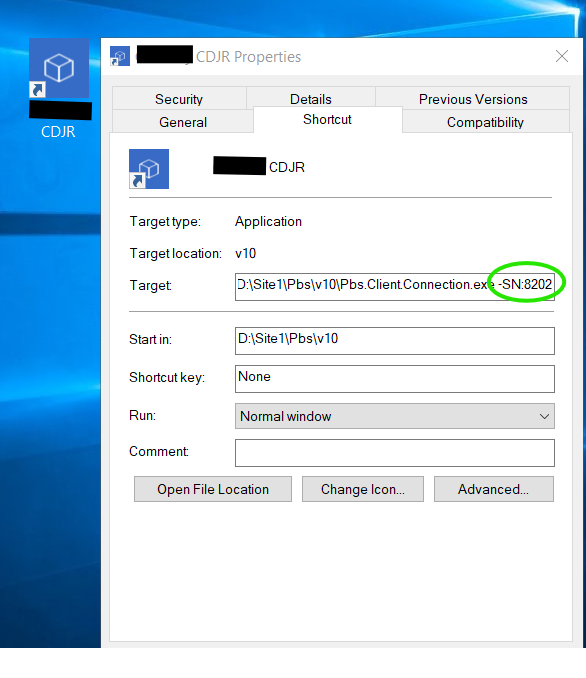
Navigate the to PBS Desktop Application icon on your computer desktop.
Right click on the application (do not open it, just right click)
Click "view properties" to see account info which includes the SN: ####.
The PBS Serial Number is a 4 digit number assigned to you account.
Finding Serial Numbers for Divisional PBS Sites
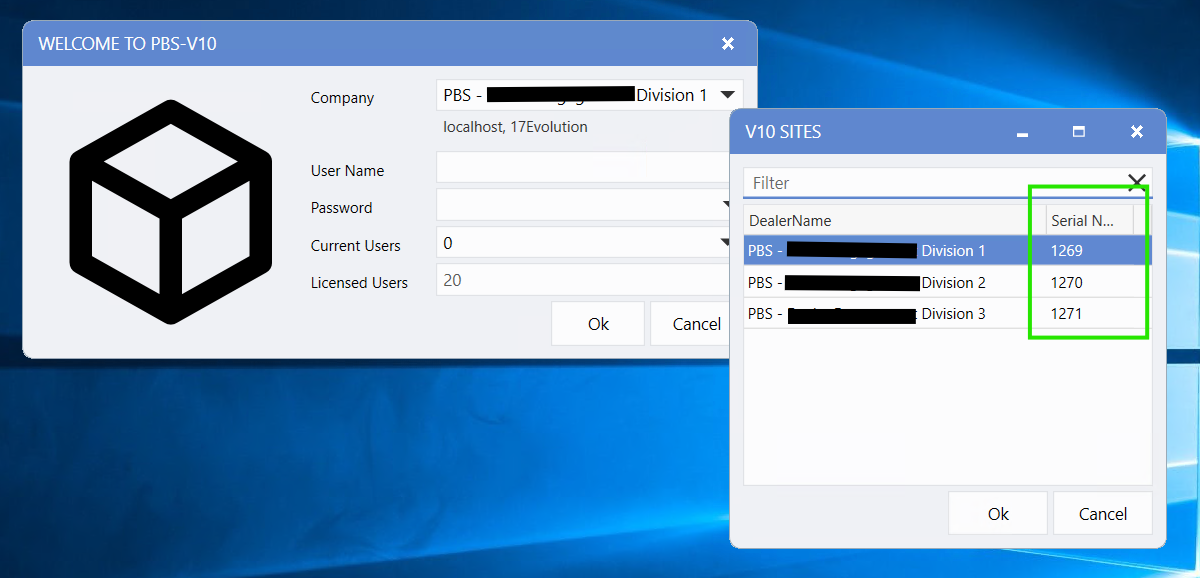
If a dealership group has multiple rooftops (divisions), you can view all their serial numbers at once from the PBS login screen:
Open PBS from the desktop icon to reach the login screen.
Click the Company dropdown at the top.
A "V10 Sites" popup will appear listing all stores in the group, along with each store's Serial Number (shown in the rightmost column).
Note: This only works for dealership groups with multiple divisions — it won't appear for individual/standalone stores.
If You Can't Find Your PBS Serial Number
If you're unable to locate your PBS serial number, please provide your store's address instead. Our Informatics team will use it to look up the serial number for you.
Questions? Email us at onboarding@autohub.io